- JavaScript 100%
| Filename | Latest commit message | Latest commit date |
|---|---|---|
|
|
||
| img | ||
| test | ||
| .gitignore | ||
| app.js | ||
| Block.js | ||
| BlockChain.js | ||
| BlockController.js | ||
| LevelDB.js | ||
| LICENSE | ||
| MemPool.js | ||
| package-lock.json | ||
| package.json | ||
| README.md | ||
| Request.js | ||

Star Notary Service
This Star Notary Service is built on top of the private blockchain I previously created. It include a Web API allowing users to interact with the blockchain and especially claim ownership of their favorite star in the night sky.
Describe stars: celestial coordinates
Here is an example of how star coordinates are represented:
RA 13h 03m 33.35sec, Dec -49° 31’ 38.1” Mag 4.83 Cen
- RA: Right Ascension
- Dec: Declination
- CEN: Centaurus
- MAG: Magnitude
Find stars

Project architecture and files
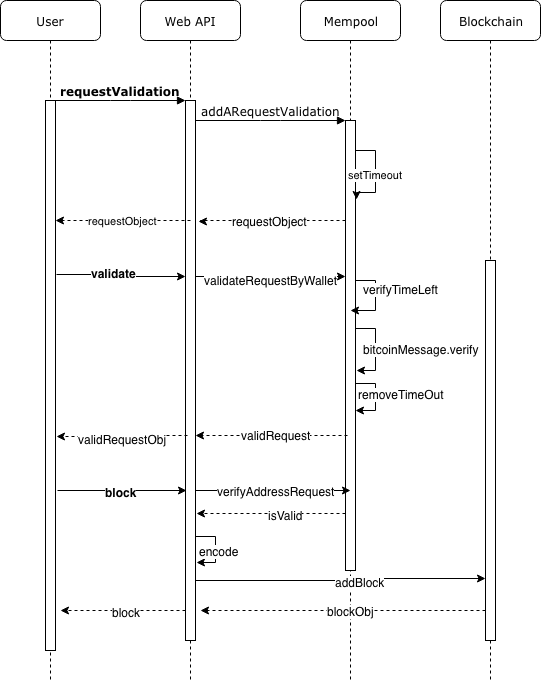
- Web API: Defines API endpoints' routes and handlers.
- BlockController.js
- Mempool: to manage validation requests to grant users the right to register a star.
- MemPool.js
- Request.js
- Blockchain: to store and persist star blocks
- Blockchain.js
- LevelDB.js
- Block.js
Getting Started
- Download or clone the repository
- Install project dependencies:
npm install - Start the web service:
node app.js
Web API
The server runs locally by default on port 8000.
You may select a different one by updating the PORT parameter of the BlockAPI constructor in app.js.
Submit a validation request
First the user needs to request validation of their wallet address before being able to register any stars.
METHOD: POST
URL: /requestValidation
PARAMETER
address: user's wallet address
RESPONSE
{
    "walletAddress": "19xaiMqayaNrn3x7AjV5cU4Mk5f5prRVpL",
    "requestTimeStamp": "1541605128",
    "message": "19xaiMqayaNrn3x7AjV5cU4Mk5f5prRVpL:1541605128:starRegistry",
    "validationWindow": 300
}
Prove ownership of wallet
After submitting a validation request, the user needs to prove that he is the owner of the considered address by providing the signature of the message returned in the previous step.
To get the required message signature, one could use the sign function of the bitcoinjs-message library or the sign feature of a wallet like electrum.
METHOD: POST
URL: /message-signature/validate
PARAMETERS
addresssignature
RESPONSE
{
  "registerStar": true,
  "status": {
    "address": "19xaiMqayaNrn3x7AjV5cU4Mk5f5prRVpL",
    "requestTimeStamp": "1541605128",
    "message": "19xaiMqayaNrn3x7AjV5cU4Mk5f5prRVpL:1541605128:starRegistry",
    "validationWindow": 200,
    "messageSignature": true
  }
}
Register star
After validation of the signature, the user can now register a star.
METHOD: POST
URL: /block
PARAMETERS
addressstar:
{
  "dec": "68° 52' 56.9",
  "ra": "16h 29m 1.0s",
  "story": "Found star using https://www.google.com/sky/"
}
RESPONSE
{
 "hash": "a59e9e399bc17c2db32a7a87379a8012f2c8e08dd661d7c0a6a4845d4f3ffb9f",
  "height": 1,
  "body": {
    "address": "142BDCeSGbXjWKaAnYXbMpZ6sbrSAo3DpZ",
    "star": {
        "ra": "16h 29m 1.0s",
        "dec": "-26° 29' 24.9",
        "story": "466f756e642073746172207573696e672068747470733a2f2f7777772e676f6f676c652e636f6d2f736b792f",
        "storyDecoded": "Found star using https://www.google.com/sky/"
      }
    },
  "time": "1532296234",
  "previousBlockHash": "49cce61ec3e6ae664514d5fa5722d86069cf981318fc303750ce66032d0acff3"
}
Retrieve stars
By height
METHOD: GET
URL: /block/[HEIGHT]

By hash
METHOD: GET
URL: /stars/[HASH]

By wallet address
METHOD: GET
URL: /stars/[ADDRESS]

Tests
Run npx ava to perform the tests defined in test.js.
Resources
- LevelDB to persist the data
- Node.js
- hapijs framework to build API web service
- crypto-js for SHA256 cryptographic function
- bitcoinjs-lib & bitcoinjs-message: bitcoin javascript libraries